Party Search system
The Party search system is designed to conveniently find the required members for a Party and to search for already created Parties to join.
To open the Party search interface, press the "P" key.
To open the Party search interface, press the "P" key.
System Setup
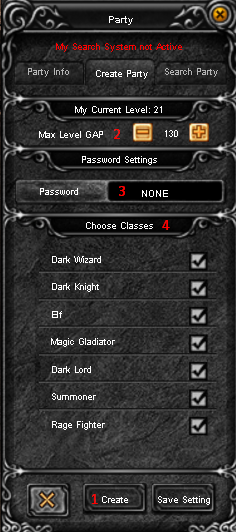
- 1Button to activate the Party member search system.
- 2Maximum level difference between Party members.
- 3Password setup (optional). The password can contain only digits, with a maximum length of 20 characters.
- 4Select character classes for your Party.
Search Party
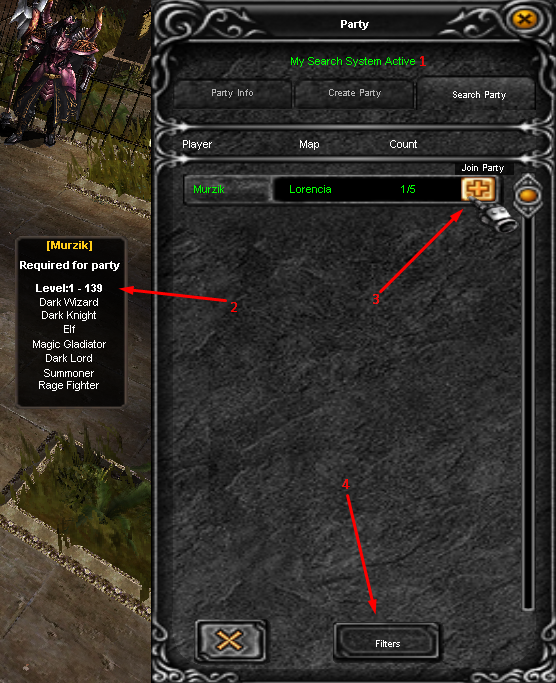
- 1Party search status. If you have submitted a request to find members for your Party, the status will be Active, which means you cannot join another Party.
- 2Information about Party requirements.
- 3The + button appears only if you meet all requirements (except when the Party has a password). Click it to join the Party.
- 4Filter settings button.
Party filter
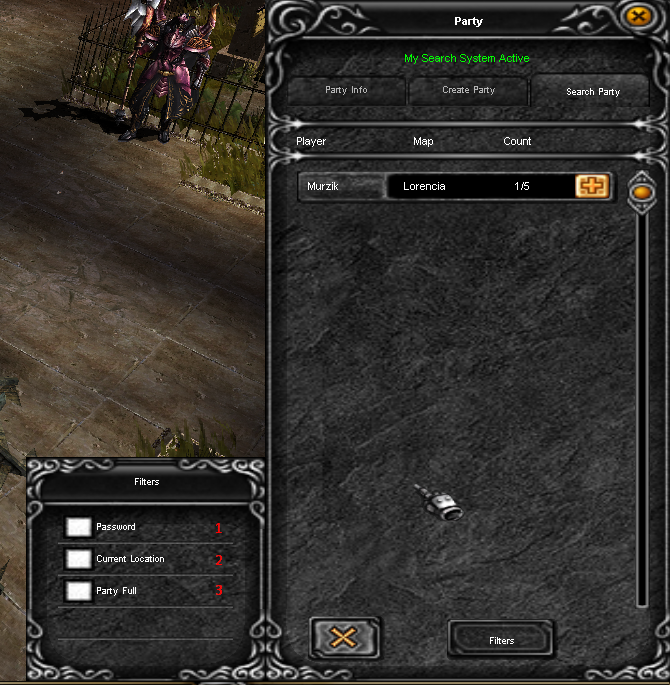
- 1Hides all Parties with a password.
- 2Shows only Parties in your current location.
- 3Hides all Parties that currently do not need players.
Discord
Now Online:
89
Market Items
Last items added on market x20 Legendary

|
Excellent Socket Spite Staff +15 +Luck
|
1508 Bon |

|
Excellent Ancient Armor +Luck
|
464 Bon |

|
Excellent Bill of Balrog +Skill
|
6 Bon |

|
Excellent Bronze Armor
|
6 Bon |

|
Excellent Leather Armor
|
6 Bon |